There is a new version of this plugin. Please download it from the plugin page
This post is about a wordpress plugin that will help you to manage your hidden affiliate links a lot easier then what others have suggested.
If you don't know why you should hide the affiliate links then continue reading, but if you already know this then skip to the plugin part of the post.
One of the best monetization methods for blogs is using affiliate programs.Money making blogs don't get their income from a single source like adsense, they also use affiliate links for a lot of services like Text Link Ads and other products.
Why hide your affiliate links?
Many bloggers think it's good to hide the affiliate links, not because they don't want their visitors to know they are affiliated but because of other reasons like:
- Changing your affiliate links is a lot less work because you have to change in just one place then on hundreds of pages where you use those links
- It hides the ugly part of affiliate codes. People tend to not trust long links with a lot of characters and unknown codes. A nicely formated and clean link is more likely to be clicked then one that contains an affiliate code in it.
- It kind of forces them to click the link instead of just typing the link (without your affiliate code ) in the browser.
- better SEO, the links don't look like affiliate links, the redirect is done from a html page that has noindex on it so search engines shouldn't look at it.
Methods to hide Affiliate links
There are a lot of methods to do this like:
- writing a .htaccess rule
- doing a http redirect from a script. Setting the HTTP location header to the destination url.
- doing a redirect from the meta of a html page
- doing a redirect from javascript by setting the window.location to the destination URL
Those methods are not hard to use but they do involve write a small piece of code and require this for each affiliate link. I will not show you in details any of those methods because there's a better, easier way to do this.
My Method to hide affiliate links
I wrote a plugin for wordpress that will let you define such redirects from a nice (AJAXy ) web interface inside your wordpress admin.
The plugin installs just like any other wordpress plugin and once installed you can start defining your affiliate link without having to write any code.
The plugin uses a meta and javascript redirect inspired by a post on John Chow dot Com about hiding affiliate links for better seo
License
The plugin is released under GPL and the usual "No Warranty" disclaimer applies
Download
Hidden affiliate links v0.1.zip
Hidden affiliate links v0.1.tar.gz
Installation
The script was tested on wordpress 2.2.3, so it you use any other version and it doesn't work let me know about and problems and I'll try to write a fix. If you use a previous version you should really upgrade to the latest version of wordpress.
Copy hidden-affiliate-links.zip and unzip or copy hidden-affiliate-links folder in wp-content/plugins then go to wp-admin -> Plugins and activate the Hidden Affiliate Links plugin
Using the plugin
After you activate the plugin you can go to wp-admin -> Manage -> Hidden Affiliate Links and add/edit/delete hidden affiliate links. For each link you have to define a slug, a destination link/code and a description.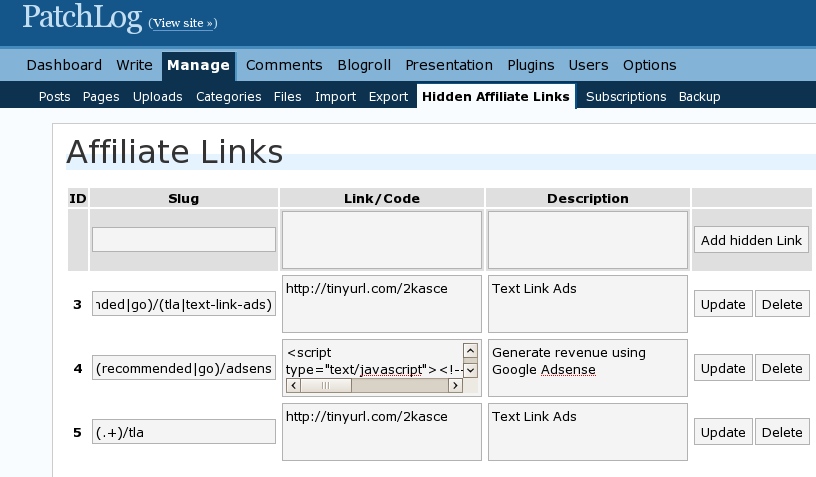
The "slug" is what the link looks like on your blog, the link/code is the part where the visitor will be redirected and the description is something to remind you what's this link about, but it's also used in the title of the page that's doing the redirect ( in case the redirect does not succeed ).
For example if the slug is go/tla and the link/code is my affiliate link for Text Link Ads http://tinyurl.com/2kasce then if you write a post on your blog and you use a link like http://patchlog.com/go/tla in your post, anyone that clicks that link will be redirected to http://tinyurl.com/2kasce
Why link/code and not just Link? In case you want to hide an affiliate link where you cannot just do a redirect, like adsense referral links that are generated by javascript, then you will have to put the javascript instead of the link.
Because you cannot redirect to a link that is generated by javascript ( because there's no link until the javascript executes ) you'll have to redirect to a page where the javascript is inserted and will execute to generate the link. In this case the user will have to actually click the generated link. So if you put anything else then a link ( starting with http or https ) in the link/code box then the script will think this is a code and will not try to redirect to the code but to a page containing the code. You can customize the look of that page by modifying : redirect_code.php
In case the redirect does no succeed for some reason then you will see a page with the affiliate link in it and the title of the page will be the one specified in the description for the link. You can also customize that page by modifying: redirect_link.php
Advanced Feature
The script is very easy to use but if you want some power and you have some knowledge of writing regular expressions then here's how you can use it. The slug part can be any regex, and anything that will match that regular expression will be redirected to the real affiliate link.
For example I could make the slug like this: (.+)/tla and everything that ends in /tla like http://patchlog.com/go-to/tla or http://patchlog.com/recommended/tla, would be redirected to my text-link ads affiliate link. Or something like go/(tla|text-link-ads) would match both links like http://patchlog.com/go/tla and http://patchlog.com/go/text-link-ads
I hope you like the plugin and let me know of any questions or problems you might have. Feedback is highly appreciated in the comments section of this post.
If you like the plugin you might want to subscribe to my full RSS feed, other great plugins might be on the way.
Update:
there's a new version that can also automatically replace keywords you define with hidden affiliate links Click here to get it.
Great work! I think I will be trying it out here shortly.
Just in case any of your readers don’t use WordPress – my post: http://adclustr.com/tips-tricks/413 shows you a few ways to do it without needing WP.
Great move, a pitty my dumb programmer is STILL working on this. Good stuff I can save $$$ on this and tell him to stop with the project.
I will give a try to this plugin after 2-3 days (won’t be around for this period).
Thanks for letting me know.
Very nice wordpress plugin. That just make hiding Affiliate Links so easy for everyone.
Giving it a try straight away buddy – let me see how it works for me. If easy, I shall promote it through my blog.
Thanks. If it’s not easy enough or you have any ideas about how this could be improved let me know.
Really awesome job! Bravo!
It seems to have a tiny bug…after adding the hidden link and the slug, it doesn’t work right away. I have to delete it, and re-add it, using a different name the next time. Is this common with this plugin?
Great plugin, it saves all the hassle work
Why Doesn’t work on my Blogs? I got this message
I’m really confused with this plug-in…i use it on some links and it works like a charm. On other links it won’t work at all. I’ve check and re-checked them a million times and I don’t see where the problem is. Where are the files located where the redirect is? I need help
Do I need to create a new directory, say “goto” with this plugin? Do I need to create a new redirect page with this plugin as John Chow suggests? If I go to manage->hidden affiliate links and fill in the fields, then hit “add hidden link”, nothing happens. It doesn’t even process the information.
Since your image above differs from the new version, I’m not sure what I could be doing wrong.
Your help is appreciated.
Curtis
You don’t need to create a new directory or a new page.
If you’re using the new version and it doesn’t let you set up new links this is because of a bug in the script. Please look in the comments section of the new version http://patchlog.com/wordpress/hidden-affiliate-links-update-version-02/ because someone has posted a solution
it doest work it goes straight to 404 pages. do i need to have permalinks ON?
I installed the plug in and got it to work with a link. After I tested the link my home page then would come up blank. I had to uninstall it to get things working normally. I tried it twice and the same thing. Not sure why it messed up my site…??
404 error for me too .what s solution for it ?
thanks in advance
Does this work with the version 2.3.3. When I am trying to add the links, it does not work.
Not work in 2.5.1 when I am trying to add the links 🙁
Does not adds new links in WordPress 2.5.1.
I think everyone and their dog has figured out by now that this plugin does not work in wp 2.5.x and it will probably never work so please stop posting these kind of comments I really don’t want to mark them as spam. I will try to release a new version that will work in wp 2.6 but I can’t promise any release date
Pefect this is just what I needed. Thanks
slug part can be any regex
did you added that part or may be give me a hint of coding?
well it is nice to have a script like this
The plugin doesn’t even work… the add link button is disabled. Armature 🙁
I think everybody knows this plugin is only working on wp .2.3
Will there be any chance that it would be working for 2.7 as well sooner or later. When I started a new blog, my web hosting installed wordpress 2.7 directly.
This plugin is very important for my blog.
there’s definitely a chance to make it work on wp 2.7. I’m working on it. It’s almost ready but lately I was hard to make the final adjustments to get a release out.
Glad to know that Mihai, you are really a hard worker man! But honestly, I was wondering why the add link button was not working since so many days. I used to try and leave thinking browser issues etc. Installed – uninstalled it couple of times but did not work out.
I have landed here while checking for a link masking plugin few months ago and came to know that it was not updated along with the new versions of WordPress.
You can achieve the same with GoCodes plugin, which is actively maintained.
Look here: http://wordpress.org/extend/plugins/gocodes/
the add link button is not working because it uses the old wp 2.3 javascript api which is incompatible with the javascript api in wp > 2.5
Any news about the compatibily with wp2.7 and the plugin?
Trying to get it out as soon as possible. I may have an alpha version by the end of the week…but I’m not sure if I should release that
Any update on whether you will have 2.7.1 compatible version out anytime soon?
Cell Phone Reviews’s last blog post..Blackberry OS 5.0: New Features Unofficially Revealed
I’m presuming that this plugin is no longer being developed? If so, anyone using it with WP 2.8 ?
Actually I’m just about to launch a new version that should work on both wp 2.7 and wp 2.8
Can’t wait for the wp 2.8 version! I’m in dire need of this!
I too need this plugin, kindly come up with it soon.
I just downloaded the 2nd file, BTW the 1st one (.zip) is not working. Anyway I will try it now, I hope it works for me. Thanks
using wp 3.0 looking forward 🙂
I just want to hide shorten this ugly and long links automatically. thanks!
Just wanted to let everyone know that there is a new version of this plugin that works with WordPress 3.0.1.
You can download it from the plugin page:
http://patchlog.com/hidden-affiliate-links/
I too need this plugin, kindly come up with it soon.
A new version has been released get it here:
http://patchlog.com/hidden-affiliate-links/
i installed on a wp 3.3.1 site and activated got this error at the top of the Hidden Affiliate Links Settings Screen
Warning: array_keys() expects parameter 1 to be array, null given in /home/XXXXXX/public_html/wp-content/plugins/hidden-affiliate-links/hidden-affiliate-links.php on line 386
Warning: join() [function.join]: Invalid arguments passed in /home/XXXXXX/public_html/wp-content/plugins/hidden-affiliate-links/hidden-affiliate-links.php on line 386
Getting 404 error for all links tested on WP version 3.3.1 and Hidden Affiliate links Version 1.01, Atahualpa theme.
Keyword replacement seems to be working, though you must save/update post, and replacement wan’t showing in my Tiny MCE editor – had to look at published post.
Too bad! This looked promising.
Any known fix out there? Thanks, all!
Used this in the past and it is a great plugin but there are definitely issues with WP version 3.3+. Hope you get it all sorted.